Influence on Local SEO
Stay visible when people search nearby. Fresh customer feedback keeps your reputation active, while more reviews and positive ratings can help your local ranking. Relevance and distance also matter.
 tap in.Find your Tap In
NFC CARDS, SIGNS & DISPLAYS
You make their day. Make it easy for them to tell the world—with a simple tap of their phone.
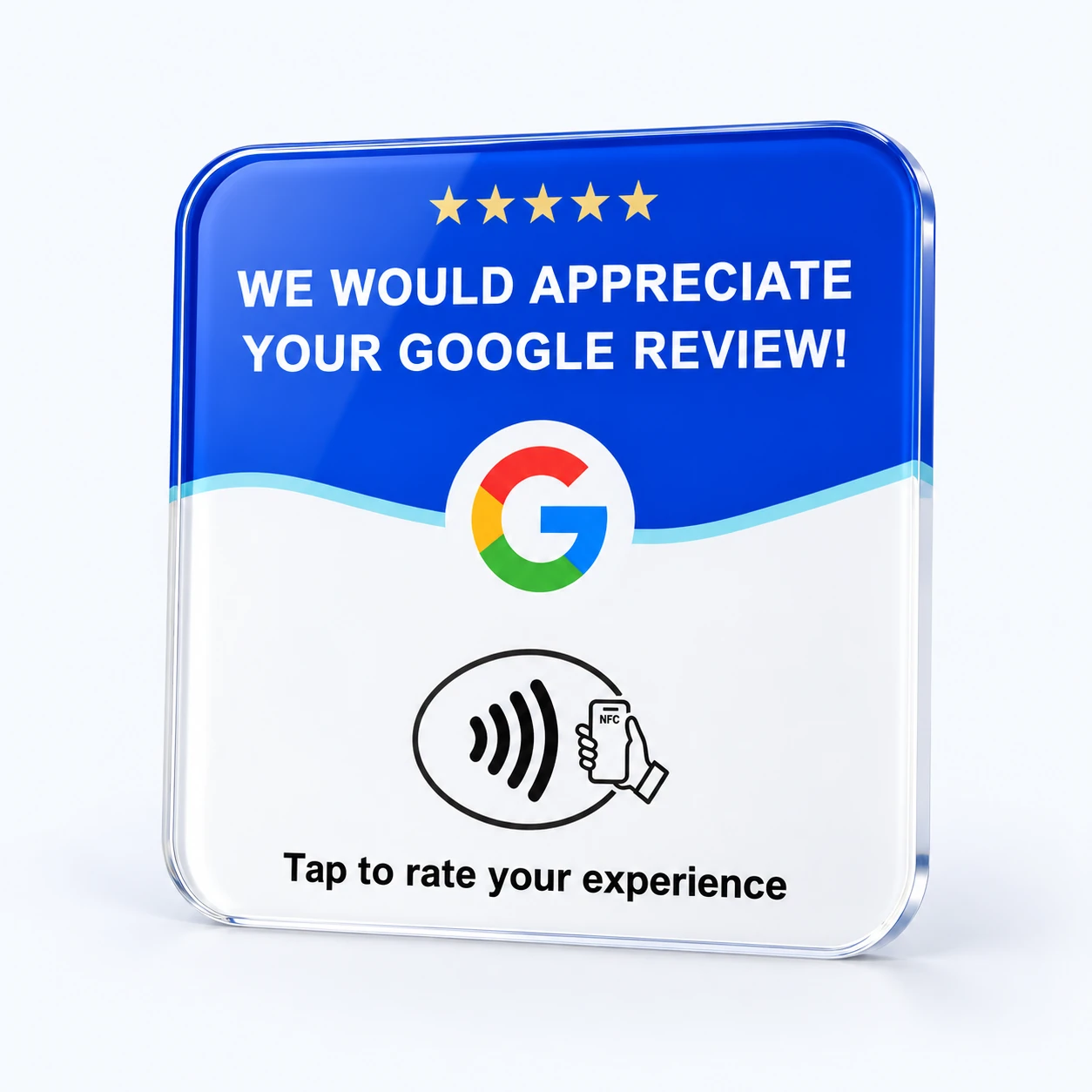
One simple tap.
So many possibilities.
WHY IT MATTERS / THE TAP IN FRAMEWORK
The IBDF framework, created by Tap In, turns everyday customer connections into four opportunities for your business: Influence, Building trust, Driving growth, and Feedback.
Stay visible when people search nearby. Fresh customer feedback keeps your reputation active, while more reviews and positive ratings can help your local ranking. Relevance and distance also matter.
Build confidence before someone walks through your door. Positive, honest reviews let real customer experiences speak for your business and help people choose you with confidence.
Turn confidence into a reason to choose you. A stronger reputation can help convert interest into visits, bookings, and purchases—connecting great service with more opportunities to grow.
Hear directly from your customers. Timely feedback shows what people love and where you can improve. Respond publicly, build relationships, and give customers a reason to keep coming back.
Invite honest feedback from every customer. Results depend on your business and service; rankings and sales aren’t guaranteed. Google’s local ranking guidance
THE TAP IN COLLECTION
On your counter. With your team.
Right where the good moments happen.
A small invitation to share a great experience.
Let your counter start the conversation.
An easy next step after a memorable visit.
A connection your team can take with them.
From an in-person visit to your online world.
Get your menu into the hands of hungry guests.
Put your Yelp business profile within easy reach.
Help guests share the experiences that stay with them.
Turn an in-person visit into your next TikTok connection.
Make your Snapchat profile a simple tap away.
Keep your local community connected to your Facebook page.
Give your Instagram a colorful place in your space.
Your link. The design you see. Standard products come as pictured. Custom designs are available only for the blue Google NFC card and business cards.
INTERACTIVE PREVIEW
Explore where a Tap In card can take your customer. Choose a destination and preview the experience right here, including Tap In’s Instagram and Hayden’s LinkedIn profile previews.
A real tap requires a physical Tap In card. Holding your phone near this screen won’t open a link.
01 Hold a compatible phone near the card.
02 Open the link notification on the phone.
03 Review, follow, connect, or explore.
All previews stay in this box. Social previews feature Tap In and owner Hayden Dewey, with optional links to their full profiles in this tab. Nothing is posted or sent automatically.
Click Start preview to explore an example Google review experience right here.
GREAT SERVICE DESERVES TO GET FOUND
For a small business, every customer interaction is a chance to build something bigger: a reputation people can see, trust, and choose.
Put Tap In to workHonest reviews help people understand your business before their first visit. Make it easier for every customer to have a voice.
Google says more reviews and positive ratings can help local ranking. A direct review link removes a step between great service and customer feedback.
Read Google’s local ranking guidanceStart at one counter or give your team a way to invite feedback wherever they work. Keep showing up, giving great service, and making it easy to stay connected.
Local results also depend on relevance and distance. Tap In makes connecting easier; review counts, ratings, rankings, and business growth aren’t guaranteed.
BUILT AROUND REAL BUSINESS
Choose the format that fits your day.
Let a small connection become a good habit.
Help guests open your menu and invite honest feedback as they finish their visit. Keep your Instagram within reach so they can find you again.
NFC SCANNER SETUP
Use your business’s Google Place ID to connect your NFC product to the right review page.
Open Google’s Place ID Finder, search for your business, and select the matching name and address. Copy the full Place ID shown for your location. It often begins with ChIJ.
Open Google Place ID FinderGoogle’s finder opens in a new tab. Come back here with your code.
Preview the link to confirm it opens the right business before programming your NFC product. Opening the page does not post a review.
GOOD QUESTIONS. SIMPLE ANSWERS.
The details that help you choose with confidence.
A compatible NFC-enabled phone reads the web link programmed into the card. The customer opens the link notification to reach your chosen destination. For Google, use your business’s Google Place ID: copy the full code from Google’s Place ID Finder, then paste it into our NFC setup helper to create and copy your Google review link. The customer signs in if needed, chooses their rating, and posts their own review.
It works with compatible NFC-enabled phones, including iPhone XS and later with background tag reading, and supported Android devices with NFC switched on. Phone position, settings, and cases can affect reading. Products with a printed QR code also offer a camera-based option. An internet connection is needed to open the destination.
No Tap In app is needed on phones that support reading NFC web links. The link opens through the phone’s normal browser or the destination’s app. Google requires customers to sign in to a Google Account to post a review.
Tap In takes customers to the review destination. Customers choose their own rating and what they want to say; a tap does not automatically post a review. Our slogan celebrates great service and the reviews it can earn. Invite honest feedback from all customers.
More reviews and positive ratings can help local ranking, according to Google. Tap In helps make leaving feedback easier, but does not control Google’s results. Relevance, distance, a complete Business Profile, and the quality of your service also matter. See Google’s guidance.
Yes. An NFC card can open a supported web URL, including Instagram, Facebook, TikTok, Snapchat, LinkedIn, Tripadvisor, Yelp, a booking page, digital menu, or website. Choose a link and matching card setup. Following, booking, posting, and other actions still require the customer’s choice. For Yelp, use a profile link for discovery and follow Yelp’s platform guidance.
Choose a review card for a simple hand-to-hand interaction, a counter display or tabletop stand for a fixed location, and a badge for mobile teams. Instagram and menu cards support those specific destinations. Select a product to see its price and best uses. Standard products use the design shown; only the blue Google NFC card and business cards offer custom designs.
Custom designs are available only for the blue Google NFC card and business cards. Every other product is supplied with the standard design shown. Your business’s own review, profile, or menu link is still configured for the matching product.
This depends on the card and how its link is configured. A changeable redirect or a writable NFC tag can allow updates; locked tags and fixed printed QR codes have limits. Include your preferred destination in your setup so the right configuration can be confirmed before you buy.
Connecting great service to 5-star reviews.